Download
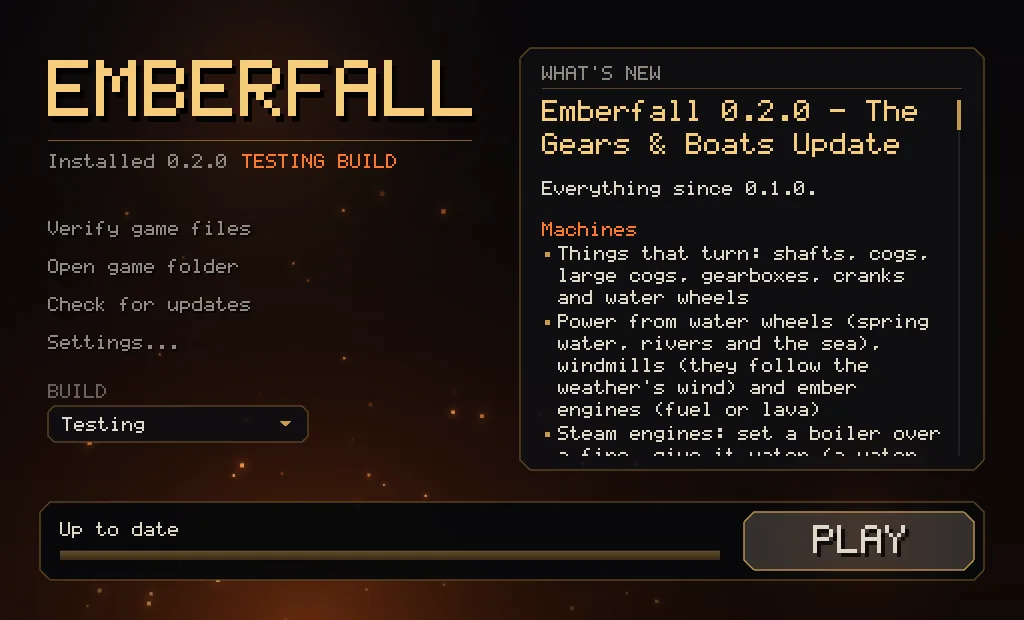
Emberfall is installed and updated through the launcher. Updates only download the files that changed, so you don't have to download the whole game again each time.
The launcher's first public release will be Emberfall 0.2.0 - The Gears & Boats Update, which is in playtesting now. If you have a playtester key, you can use the launcher already.
Installing
- Unzip it into its own folder, for example in Documents or ~/Games.
- Run the launcher. Windows may show an "unknown publisher" warning. Click More info and then Run anyway. On Linux you might need to run
chmod +x emberfall-launcherfirst. - Click INSTALL, then PLAY once it's done.
About the launcher
- Updates only download changed files, usually a few MB.
- Updates never touch your worlds or settings.
- Verify game files checks every file and fixes anything that's broken.
- Releases are signed, and the launcher won't install anything that isn't.
- You can choose where the game is installed in Settings, and move it later.
- The launcher updates itself too.
System requirements
| Graphics | OpenGL 4.5. Most graphics cards from 2014 or later, with an up-to-date driver from NVIDIA, AMD or Intel. |
| Windows | Windows 10 or 11, 64-bit. |
| Linux | 64-bit, glibc 2.34 or newer (Ubuntu 22.04, Debian 12, Fedora 36 or later). |
| Disk space | About 50 MB, plus your worlds. |
| First download | About 16 MB on Linux, 21 MB on Windows. |
Playtesters
If you have a playtester key, click Playtester key... in the launcher and paste it in. You can then switch between the Live and Testing builds from the Build menu.
Both builds use the same worlds folder, so back up any world you care about before opening it in a testing build.